A Beginner’s Guide to Setting Up A Successful Etsy Shop
A Beginner’s Guide to Setting Up Your Etsy Shop: Tips and Best Practices
Setting up a successful Etsy Shop is one of those concepts that looks exciting and a little bit scary all at the same time. You’ve seen others do it — people turning avocations or leftovers into something which actually brings in money — and now it’s your turn. The good news? You don’t have to be a mastermind in order to start. You just need a solid plan, a small amount of patience, and maybe a large cup of coffee.
Most sellers remember that very first posting: page refreshing over and over again, hoping if anyone would ever notice. And that’s the greatest thing about Etsy — it’s an art and a curiosity blend. Building your shop from scratch will seem to be overwhelming, but after following step-by-step, it becomes very doable.
We’ll cover exactly what to do, from account signup to that long-awaited click on that big “Open Shop” button.
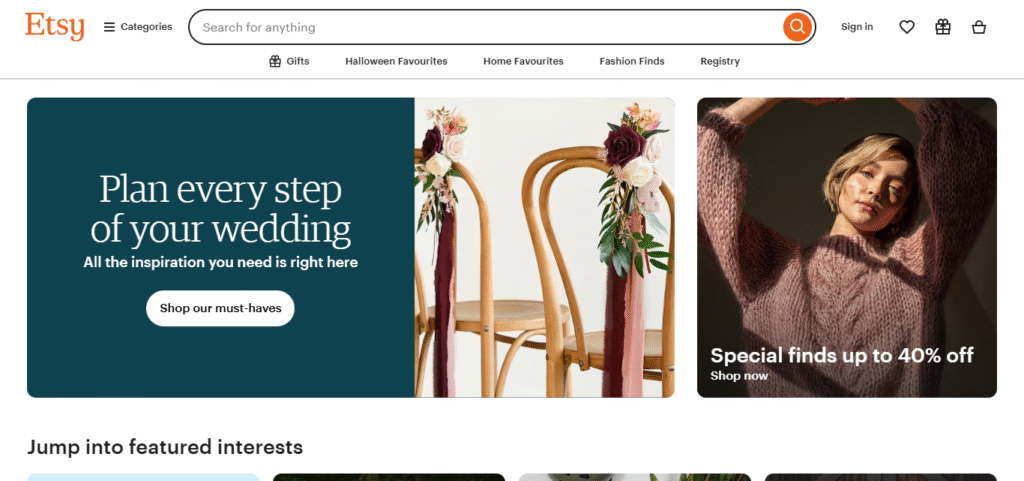
Step 1: Setting Up Your Etsy Account
All stores begin the same: with a basic store. Go to Etsy.com, tap “Sign in” or “Register”, and choose how you’d like to sign in. You can sign in with your email address, Google, Apple, or Facebook login. When you’ve done that, tap “Sell on Etsy.”
You’ll be asked to enter some basics:
- Your location and currency (this affects how prices display).
- Your shop language.
- A few personal preferences on how often you plan to sell.
It’s not a lengthy application, but it matters. If you select the wrong currency or forget to turn on some settings, you’ll be making yourself backtrack and fix it later — which gets tricky. Take two minutes and double-check everything twice.
When you come to the payment options, choose Etsy Payments. It’s easiest to use because buyers can pay with gift cards, PayPal, or credit cards, and Etsy takes care of it automatically. You’ll just link your bank account for payouts.
Some quick tips that will save you time:
- Use a business email address. It’s displayed on order confirmations.
- Turn on two-factor authentication for security.
- Update your contact info — Etsy manually verifies sellers occasionally.
Once you’ve done that, hooray — you’ve passed the first challenge.
Step 2: Choosing Your Shop Name and Branding
This step catches many people out. Picking a name is enjoyable, but when you look at Etsy having only 4–20 characters with no spaces, it becomes tricky in a hurry. However, that limit makes you think creatively.
How to Choose a Good Shop Name
- Make it short and easy to spell.
- Reflect what you’re selling but don’t pledge to one niche.
- Don’t use weird spellings that people will never remember.
- Make sure it’s not already taken (Etsy and social media handles).
Here’s a little secret: imagine someone saying your shop name out loud. Does it sound like something you’d want tattooed on a box or on a thank-you card? If so, then you’re well on your way.
Don’t stress if you don’t get it perfect to start. You can always change your shop name later (once) if needed. Consistency is key — same name, same voice, everywhere on Etsy and your socials.
Making a Simple Brand Aesthetic
You don’t need expensive logos or designer colors. It’s all about being recognizable.
Start with small, simple choices:
- A logo — even a bare-bones wordmark is fine.
- A banner that uses the same color scheme you’ll have in your listings.
- Two or three colors within your aesthetic.
If you make boho jewelry, soft neutrals might be for you. If you’re selling digital prints, bold and colorful might be more effective. Stick to a consistent palette, and you’ll be professional overnight.
Step 3: Adding Products to Your Shop
Now we’re at the heart of your shop — the listings. This is where things start to feel real.
Each listing is its own mini webpage, complete with photos, descriptions, pricing, and tags. Don’t rush these; they’re what buyers actually see when they search.
Take Photos That Feel Real
Good product photography isn’t about high-end gear. It’s about light, angle, and authenticity. Use your phone if it has a good camera, but do it in natural light — by a window or outdoors on an overcast day.
Attempt to include at least five images for each product:
- A full, clear front image.
- A close-up to display detail.
- A photo demonstrating size (in someone’s hand or alongside an object).
- A lifestyle shot — your product in action.
- A packaging or branding shot.
Etsy prefers square images (1:1), ideally 2000 × 2000 pixels. They display beautifully in search results and don’t get cropped oddly. Keep simple backgrounds — white or neutral — so your product is the center of attention.
Here’s something most beginners forget: buyers love context. If you’re selling prints, show them framed on a wall. If it’s a mug, show it on a breakfast table. You’re not just selling an item — you’re selling the moment around it.
Write Honest, Clear Descriptions
A good description reads like a friendly conversation, not a sales pitch. Talk about what makes your product special and how it fits into someone’s life.
Keep it simple:
- What is it made of?
- How large is it?
- Any care instructions?
- What’s included in the order?
Make use of bullet points where you can, and don’t copy the title verbatim. Use keywords organically (e.g., “handmade mug” or “silver name necklace”). It helps SEO without becoming formulaic.
Price Fairly, Not Cheaply
Pricing is uncomfortable initially — you don’t want to overcharge, but you don’t want to shortchange yourself either. Simple rule of thumb:
(Material cost + time + Etsy fees) + 20–30% margin = reasonable price.
Pricing your work too cheaply will get you sales initially, but it leaves you drained later on. Start reasonable, not bargain. You can always adjust once you see what the market will tolerate.
If you’re unsure, look up similar items and find a middle ground between high and low. Etsy buyers appreciate honesty — they’ll pay more if they believe your product has genuine care behind it.
Step 4: Finalizing Your Shop Settings and Going Live
You’ve got your products ready, now it’s time to get all the behind-the-scenes details sorted.
Write Your Shop Policies
Take your policies to be your promise to customers. They set expectations and prevent misunderstandings. Put in:
- Shipping and processing times.
- Return/exchange policies.
- Payment terms.
- If you take custom orders or not.
Copy-paste is convenient, but take five minutes to make it your own. Clarity fosters trust, and Etsy gives you credit for a fully filled-out profile.
Add an “About” Section
This is where you tell your story — the “why” of your store. Don’t make it sound like a sales pitch. Tell how you started, what you’re passionate about, and what’s unique about your products.
For example:
“I used to make simple jewelry in my apartment using leftover beads from art school projects. Now I make small batches for those who value simple, everyday adornments.”
That single little paragraph makes you human, and that’s what customers on Etsy adore most.
Include one or two photos of your workspace or tools. Even if it’s a kitchen table corner — share it. People want to know the actual maker of the product.
Do a Quick Quality Check Before Launch
Take a deep breath before hitting “Open Shop” and double-check:
- Do my photos look cohesive?
- Are titles and tags completed?
- Do I have a minimum of three active listings?
- Is my banner mobile-friendly?
Visit your shop as if you were a buyer. Would you trust you enough to purchase something? If so — go ahead.
Now click “Open Your Shop.” That’s it. You’re live.
Don’t freak out if nothing sells for the initial 24 hours. Etsy lists items gradually. Continue posting, including pictures, and messing around with descriptions. Velocity loses to persistence every time.
First-Time Etsy Seller Bonus Tips
Take your time. But a few bad habits will help you grow faster:
- Utilize all 13 tags per item — that’s 13 more ways that purchasers can locate you.
- Reply promptly to messages — it affects your shop rating.
- Add new items frequently. One fresh listing per week enhances your visibility.
- Promote discreetly. Pin your listings on Pinterest or share them on Instagram. Spamming is a no-no — just tell your story.
- And lastly: update your pictures from time to time. Better lighting, crisper focus, uncluttered background — it all counts.
Avoid These Common Pitfalls
Hiccups are experienced by every new vendor. The key is to catch them early.
- Emptying policies. Buyers see it as a red flag.
- Leaving out product labels. Organic traffic will be lost.
- Mismatched images. Cluttered presentation drives people away.
- Over-editing product descriptions. Keep them natural, keyword-stuffed not.
Mistakes are made — everybody makes them. What is key is that you learn and keep improving. Etsy values listening shops; every update tells the algorithm that you’re listening.
Conclusion
Setting up your Etsy shop isn’t just a checklist — it’s your first real step into selling something made with your own hands. You’ll tweak things, learn from feedback, and maybe even laugh at your first few photos later on. That’s all part of it.
The key is to get going. Create your account, pick a name you’re happy with, list your first items, and open the doors. The rest — SEO, marketing, perfect lighting — will come in due time.
Don’t wait until it’s all just so before you take the plunge. Nobody starts perfectly on Etsy; they start curious and willing to learn. And that is enough.
So go for it — launch your store, list that first item, and see what’s coming. It’s one of the best feelings when that initial “You made a sale!” email appears in your inbox.